
How to Identify Consistent 3D Filament: A Hands-On Guide
Table of Contents
- Why Filament Consistency Matters for Your Prints
- Understanding Filament Diameter Tolerance and Extrusion Consistency
- How to Test Filament Quality at Home
- Recognizing Filament Moisture Absorption Signs
- Tracking Batch Consistency and Variance
- Identifying Quality Filament vs Budget Options
- Common Print Failures and What They Reveal
- Frequently Asked Questions
Last Updated: October 7, 2026
Why Filament Consistency Matters for Your Prints
Inconsistent filament is the silent killer of 3D printing projects.
When diameter fluctuates, your extruder can't hold consistent flow: 1.80mm starves the nozzle, 1.70mm over-extrudes, and the variations compound across hundreds of layers.
Learning to identify consistent 3D filament before it hits your printer saves money, time, and frustration.
Understanding Filament Diameter Tolerance and Extrusion Consistency
Filament diameter tolerance is the acceptable range of thickness variation across a spool. Most quality filament targets ±0.03mm on 1.75mm material, tight, but it matters enormously for print quality.
What tolerance ranges mean for print quality
Your extruder expects a specific diameter; when it stays consistent, material feeds at a predictable rate.
When diameter wanders outside tolerance, two things happen:
- Undersized filament (1.72mm or thinner): Your extruder feeds more material per rotation to fill the nozzle. Result: over-extrusion, oozing, and poor surface finish.
- Oversized filament (1.78mm or thicker): The extruder can't push enough material through. Result: under-extrusion, weak layer adhesion, and visible gaps between lines.
Quality manufacturers hold tight tolerance control through extrusion and winding; budget filament often drifts to ±0.10mm or more.
The volumetric math behind diameter drift
Diameter variance matters more than most people assume because flow scales with the square of the radius, a small diameter change produces a much larger change in plastic volume per millimeter of filament.
Run the numbers on a 1.75mm nominal filament:
- At 1.75mm, cross-sectional area is roughly 2.405 mm².
- At 1.80mm, area climbs to about 2.545 mm², roughly 5.8% more material per millimeter of feed.
- At 1.70mm, area drops to about 2.270 mm², roughly 5.6% less material.
A spool drifting between 1.70mm and 1.80mm can swing effective flow by more than 11% across one print, blobs where it ran fat, gaps where it ran thin, and an inconsistent surface finish despite unchanged settings.
How diameter variance causes common print problems
Diameter variance shows up as familiar symptoms:
- Stringing and oozing occur when over-extrusion pushes excess material between travel moves.
- Layer separation and warping happen when under-extrusion weakens the bond between layers.
- Nozzle clogging can result from inconsistent flow causing pressure spikes that jam the nozzle.
These symptoms look identical whether the cause is diameter, nozzle temperature, or slicer settings. That's why identifying consistent 3D filament upfront eliminates one major variable before you troubleshoot anything else.
A repeatable diameter audit you can run in ten minutes
Here is the protocol that separates a real measurement from a guess:
- Cut a 5-meter sample. Pull filament from the middle of the spool, not the outer wrap where winding tension can compress it slightly.
- Measure every 20 cm. That gives you 25 data points across the sample, enough to catch a slow drift that a handful of readings would miss.
- Rotate the caliper 90° at each point. Filament can be slightly oval rather than round. Measuring the same orientation every time hides that.
- Log min, max, and average. The average tells you if the spool is centered on 1.75mm. The range tells you how much it wanders.
- Compare the range to the spec. Under 0.05mm total spread is solid for hobby-grade filament. Under 0.03mm is excellent. Anything over 0.08mm will fight you on every print.
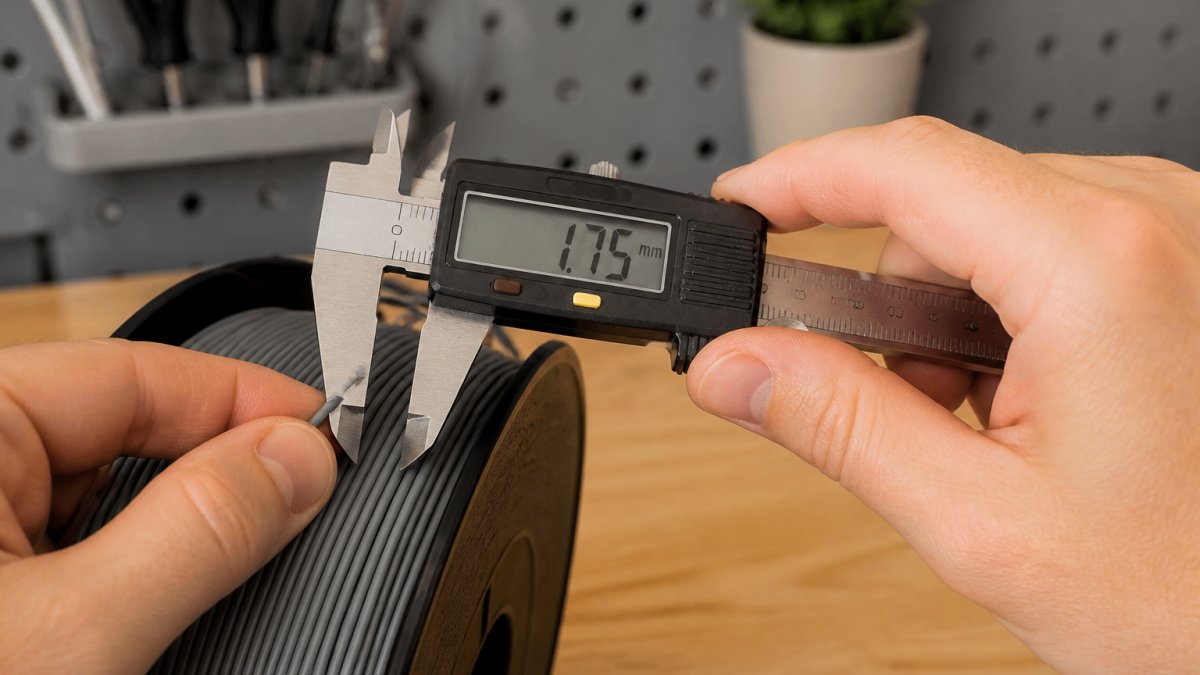
A digital caliper gives you hard data instead of a hunch. NextShapes Standard PLA and ELEGOO PLA both maintain tight diameter control.

How to Test Filament Quality at Home
You don't need lab equipment to verify filament consistency. Three simple tests catch most quality issues before they ruin a print.
Measuring diameter with a digital caliper
A digital caliper gives you hard data on filament thickness.
Steps:
- Unwind fresh filament from the spool, grab a section from the middle, not the outer wrap where tension might compress it slightly.
- Measure at five points along a 2-meter section. This catches diameter drift within a single spool.
- Record each reading to the nearest 0.01mm.
- Calculate the range. Subtract the smallest reading from the largest. Good filament stays under 0.05mm variance. Anything wider signals quality issues.
Visual inspection for defects and inconsistencies
Your eyes catch what calipers miss. Spend two minutes inspecting the filament.
What to look for:
- Discoloration or streaking suggests uneven pigment dispersion or contamination in the polymer.
- Visible bubbles or voids mean trapped air during extrusion, these create weak points that snap under printing stress.
- Surface cracks or brittleness indicate moisture absorption or degraded polymer.
Quality filament feels smooth and uniform, consistent in color and diameter along its length. Defects in the first meter usually mean the rest of the spool has them too.
Physical density and feel assessment
Flex the filament gently. Quality material has consistent resistance and doesn't snap easily; brittle filament that cracks under light bending has absorbed moisture or degraded thermally. Also check the spool: tight, even winding suggests controlled production tension, while loose, uneven wrapping often correlates with inconsistent extrusion.
Recognizing Filament Moisture Absorption Signs
Moisture is the invisible enemy of many thermoplastic filaments. PLA, PETG, and other polymers are hygroscopic, they absorb water from humid air.
How hygroscopic materials absorb water
Absorbed water works into the polymer structure; during printing, heat vaporizes it inside the nozzle, creating steam bubbles that disrupt flow and weaken layer adhesion. PETG is especially susceptible, a spool left open in humid conditions can absorb enough water to cause visible defects within days.
Print artifacts that signal moisture damage
Moisture-damaged filament produces distinctive symptoms:
- Popping or crackling sounds from the nozzle during printing.
- Stringing and oozing that gets worse as you print (as the nozzle temperature rises).
- Weak layer adhesion and parts that delaminate easily after printing.
Prevention is easier: store filament in airtight containers with silica desiccant, especially PETG and nylon.
Tracking Batch Consistency and Variance
One spool of ELEGOO Rapid PETG might print perfectly; the next from the same manufacturer could flow differently. Consistency isn't just a property of a single spool, it's a property of a product line over time.
ELEGOO PLA Filament 1 kg - Black →

Batch variance happens because extrusion conditions shift, temperature drifts, humidity changes, and material sourcing all affect the final product.
Why batch variance is invisible until it bites you
A single spool can pass every check, smooth surface, tight diameter, no moisture, and still print differently from the last spool of the same color and material. The difference shows up subtly:
- Flow behavior. A batch with slightly different melt flow index may need a few degrees more or less nozzle temperature to extrude cleanly.
- Color and opacity. Pigment dispersion varies between runs, so "Galaxy Black" from one batch can look noticeably different from the next.
- Brittleness. Resin blends or regrind content can shift, making one batch more prone to snapping on the spool.
None of these appear on a spec sheet. You only catch them by tracking.
Building a batch log that actually gets used
A log only works if it's fast to fill in. Keep it to six fields, recorded the moment you open a new spool:
- Batch or lot number, usually printed on the label or spool hub. This is the single most important field.
- Date opened
- Diameter audit result, average and range from your 5-meter sample.
Reading the patterns
After five or six spools, patterns emerge that no spec sheet reveals:
- Consistent diameter but inconsistent flow points to resin or additive changes, not extrusion control.
- Widening diameter range over time suggests the manufacturer's line is drifting or they switched resin suppliers.
- A single bad batch in an otherwise clean run is often a one-off, don't condemn the whole product line.
The additive factor most guides ignore
Pure polymers are easiest to keep consistent. Fillers and additives make it harder, and batch variance gets worse:
- Carbon fiber and glass fiber filaments depend on even fiber distribution. Uneven dispersion creates weak spots and inconsistent flow.
- Wood-fill and metal-fill filaments vary with particle size and loading percentage, which can shift between batches.
- Silk and color-shift filaments rely on pigment and additive blends that are notoriously hard to reproduce exactly.
If you print lots of filled or specialty filament, expect wider batch variance and track it closely. A tight diameter reading on carbon-fiber spool tells you less than on plain PLA, because internal structure matters as much as the outer dimension.
Identifying Quality Filament vs Budget Options
Not all filament is created equal. Here's what separates reliable material from the rest.
What separates premium filament from lower-grade alternatives
Premium manufacturers invest in tight extrusion control, quality polymer sourcing, proper moisture management, and testing protocols that catch defects before spools ship.
At Pewgilist, we stock filament like ELEGOO PLA and NextShapes Standard PLA because they deliver consistent results: tight diameter and reliable layer adhesion.

Reading manufacturer technical data sheets
Reputable manufacturers publish specs. Look for:
- Diameter tolerance (should be ±0.03mm or tighter for 1.75mm filament)
- Tensile strength (measured in MPa, higher is stronger)
- Glass transition temperature (Tg, how the material behaves when heated)
NextShapes Standard PLA lists 56 MPa tensile strength and 53°C heat deflection temperature; ELEGOO Rapid PETG specifies a 225-255°C nozzle range and 75°C heat deflection temperature. If a manufacturer won't publish specs, that's a red flag, you're buying blind.
Common Print Failures and What They Reveal
Print failures are diagnostic tools. The way a print fails tells you what went wrong.
Under-extrusion and over-extrusion indicators
Under-extrusion shows up as:
- Thin, weak lines that don't bond properly to the layer below.
- Visible gaps between extrusion paths.
- Parts that snap easily under hand pressure.
Over-extrusion looks like:
- Thick, blobby lines that overlap and merge together.
- Loss of fine detail and sharp edges.
- Glossy, wet appearance to the print.
If a test print shows under- or over-extrusion, check filament diameter before adjusting your slicer, variance is often the culprit.
Nozzle clogging, stringing, and warping patterns
Nozzle clogging (partial or complete blockage):
- Sudden loss of extrusion mid-print.
- Clicking or grinding sounds from the extruder.
- Filament diameter inconsistency can contribute by causing pressure spikes.
Stringing (thin plastic threads between parts):
- Often signals over-extrusion or moisture in the filament.
- Inconsistent diameter makes flow control harder, worsening stringing.
Warping (corners lifting or parts curling):
- Usually a bed temperature or adhesion issue, but weak layer adhesion from under-extrusion makes it worse.
- Filament consistency affects how well layers bond.
Track which prints fail and how. If every spool from a certain brand causes the same failure, the filament is the problem, not your printer settings.
Identifying consistent 3D filament takes practice, but the payoff is immediate: fewer failed prints, less wasted material, more time making things.
When you're ready to restock, Pewgilist carries filament engineered for consistency. ELEGOO PLA and NextShapes Standard PLA deliver reliable diameter and extrusion performance that let you focus on design.
Frequently Asked Questions
How can I measure filament diameter consistency at home?
Use a digital caliper to measure the filament at multiple points along the spool, spacing measurements at least 1 meter apart. Record each measurement and calculate the average diameter. Most quality filament maintains 1.75mm ± 0.03mm tolerance. Consistent measurements across the spool indicate stable extrusion, while variance greater than 0.05mm suggests inconsistent material or manufacturing issues that will affect print quality and flow rate calibration.
What are the signs of low-quality 3D printer filament?
Low-quality filament shows visible defects like voids, bubbles, or discoloration when inspected closely. During printing, it causes under-extrusion, stringing, nozzle clogging, and inconsistent layer adhesion. The spool may have uneven winding, and the filament diameter varies noticeably. Poor tensile strength means prints snap easily. Checking a manufacturer's technical data sheet for polymer composition and thermal stability ratings helps identify budget options lacking the consistency needed for reliable prints.
How do I know if my filament has absorbed moisture?
Hygroscopic materials like PETG and certain PLA blends absorb water from air, causing print artifacts. Signs include stringing, bubbles in the print, surface finish degradation, and reduced layer adhesion. If filament feels slightly damp or smells off, moisture absorption has likely occurred. Store filament in airtight containers with desiccant packets to prevent this.
Why does my filament diameter vary throughout the spool?
Diameter variance occurs when the extruder during manufacturing doesn't maintain consistent flow rate or cooling. Inconsistent polymer composition, additives, or fillers also cause variance. This directly impacts your printer's flow rate settings and creates under-extrusion and over-extrusion zones in the same print. Premium filament from trusted manufacturers maintains tighter tolerance through quality control. Budget options often show greater variance, making them harder to calibrate and more prone to print failures and surface finish problems.